A4 Bifold Special Grilled Food Menu Design Bundle
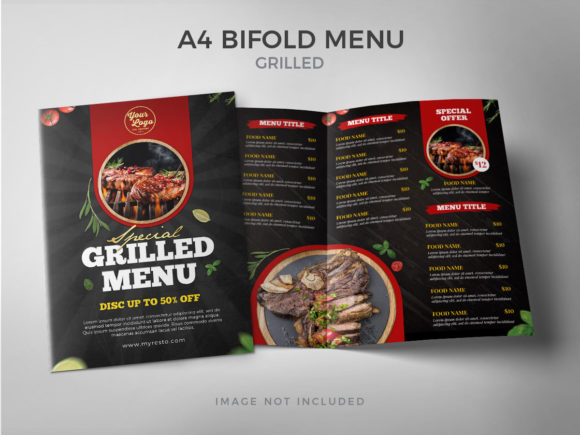
When it comes to restaurant menus, especially for fast-casual spots like pizza places or burger joints, the design plays a huge role in customer experience. The A4 Bifold Special Grilled Food Menu is a digital template bundle that offers a clean, professional layout with an emphasis on grilled food presentation. This design is not just about looks—it’s built to help you communicate your offerings clearly and efficiently, while making it easy for you to customize every element.
What Makes This Template Stand Out?
The A4 Bifold Special Grilled Food Menu is crafted with practicality in mind. Its bifold format allows for two-fold presentation, maximizing space without overwhelming the reader. The template includes a bleed area and safety zone, ensuring that when printed, everything aligns perfectly and no content gets cut off. It's ideal for print-ready use, whether you're producing physical copies for your counter or preparing high-resolution PDFs for online ordering platforms.
Visually, the design has a warm and inviting feel—perfect for showcasing grilled items like burgers, pizzas, kebabs, and more. With its structured layout and generous spacing between sections, customers can easily scan through options and make decisions quickly. The overall personality of the template is modern yet approachable, which helps reinforce a brand that's both trendy and trustworthy.
Customization at Your Fingertips
One of the most appealing aspects of this template is how customizable it is. As a fully layered PSD file, you can modify any part of the design—from swapping out photos to adjusting colors and shapes. Whether you're using Adobe Photoshop or another editing tool, the well-organized layers make it straightforward to personalize the menu to match your branding or seasonal specials.
- Fully editable text: Change fonts, sizes, and styles to reflect your brand voice.
- High-resolution graphics: 300 DPI ensures sharp, professional prints.
- Easy image replacement: Simply drag and drop new images into the designated layers.
This level of flexibility means you don't need advanced design skills to make it work. Just open the file, tweak what you need, and export it for printing or digital use. The result? A polished menu that feels tailor-made for your business.
Choosing the Right Fonts for Your Brand
Typography is one of the key elements that shape how customers perceive your restaurant. The A4 Bifold Special Grilled Food Menu uses a free font that balances legibility with visual appeal. Depending on the font used, your menu can convey different vibes—modern, rustic, playful, or premium. Since the template is fully editable, you have the freedom to choose a typeface that aligns with your brand identity.
If you're looking for a bold statement, consider using a premium display font for headings. These fonts often have unique characters and are great for drawing attention to special offers or signature dishes. For body text, a serif or sans serif font can enhance readability, especially when listing ingredients or prices. Script or handwritten fonts may be appropriate for logos or taglines but should be used sparingly in long blocks of text.
Here’s a quick breakdown of where different font types might fit in your menu:
- Display Font: Ideal for main titles and promotional banners.
- Serif Font: Adds a classic, elegant touch for pricing and descriptions.
- Sans Serif Font: Clean and modern, perfect for digital versions or minimalist branding.
- Script/Handwritten Font: Use as a logo or in creative accents, but avoid overuse.
Font pairing is also something to consider. If you’re combining multiple fonts (like a bold header with a softer body), ensure they complement each other in weight and style. A mismatched pair can confuse the reader and dilute your brand message. Always test your choices with real content before finalizing the design.
Design Assets That Enhance Readability and Brand Perception
Menus aren’t just about what’s served—they’re also about how it’s presented. The right design assets can guide the eye, highlight key items, and create a sense of urgency. In the A4 Bifold Special Grilled Food Menu, thoughtful use of white space, color blocks, and icons helps organize information in a way that feels intuitive and visually balanced.
For example, using contrasting colors for categories like “Classic Burgers” and “Gourmet Pizzas” makes navigation easier. Highlighting best sellers with a subtle border or background shade can subtly influence customer choices. These small touches contribute to a better visual hierarchy, ensuring important details stand out and less critical ones remain accessible but unobtrusive.
Consistency in typography across your menu is also crucial. If your logo uses a creative font, try to match the tone in your headers or promotions. This consistency builds brand recognition and makes your marketing materials feel cohesive. From napkins to social media posts, having a unified look strengthens how your audience perceives your business.
Where Can You Use This Design?
The A4 Bifold Special Grilled Food Menu isn’t limited to just restaurants. While it's tailored for grilled food concepts, the design can adapt to various industries. Here are some common applications:
- Restaurant Menus: Perfect for pizzerias, burger joints, or grills with a focus on fresh, flame-kissed meals.
- Editorial Design: Use it for food blogs or magazines featuring grilled recipes and cooking tips.
- Packaging Design: Repurpose the layout for takeout boxes or branded packaging inserts.
- Web Design: Create downloadable PDFs or convert it into a responsive web menu for online orders.
- Social Media Graphics: Extract key sections to promote daily specials or featured dishes on Instagram or Facebook.
Entrepreneurs and marketers will appreciate how this template can serve as a foundation for broader branding efforts. Small business owners who want to maintain a consistent look across all their marketing collateral can benefit from using the same typefaces and layout principles found in this menu design.
Practical Tips for Customization and Testing
To get the most out of the A4 Bifold Special Grilled Food Menu, start by evaluating your existing brand identity. What colors represent your restaurant? What tone do you want to project—casual, gourmet, family-friendly? Once you have a clear direction, begin replacing placeholder content with your actual menu items, pricing, and photography.
Testing is essential. Print a sample version and read it in natural lighting. Does the font hold up? Are the colors vibrant enough? For digital use, zoom in and check how it appears on mobile devices. Remember, the goal is to make the menu as functional as it is attractive.
Also, review the included styles within the PSD files. Look for variations in headers, subheaders, bullet points, and section dividers. Understanding these components will help you maintain a consistent look throughout the entire document. And if you plan to use the font beyond the menu—like in signage or packaging—make sure it works well in different contexts and scales.
Finally, always double-check the licensing information for the font being used. Even though the template itself is designed for commercial use, individual typefaces may have restrictions depending on their source. Most free fonts are safe for personal and commercial projects, but it's good practice to verify before publishing anything publicly.
Real-World Applications and Creative Insights
Let’s say you own a local burger joint known for its flame-grilled patties and artisanal toppings. Using the A4 Bifold Special Grilled Food Menu, you could highlight your top-selling burgers with rich imagery and bold headers. Pair them with a warm, earthy color palette to evoke comfort and quality. This kind of design choice supports audience engagement by making the menu feel curated and authentic.
Another example: a food blogger who runs a YouTube channel focused on grilled recipes. They could use this template as part of their printable content library, offering followers a clean, organized menu-style format for meal plans or recipe cards. The high-resolution nature of the design ensures it looks sharp both on screen and in print.
From a brand strategist’s perspective, the A4 Bifold Special Grilled Food Menu serves as more than just a template—it’s a starting point for developing a strong visual language around your grilled food offerings. By carefully selecting colors, fonts, and layout structures, you can subtly reinforce values like freshness, flavor, and craftsmanship.
In terms of design assets, the template provides a solid base that can be expanded. Add your logo, brand colors, and custom illustrations to create something truly unique. Think of it as a blank canvas that already knows the rules of good design—you just fill in the blanks with your story.
Why Designers and Business Owners Love It
Many designers and entrepreneurs gravitate toward this template because it’s efficient and effective. It removes the guesswork from creating a menu by providing a ready-to-use structure that still allows for creativity. The layered PSD files mean there's no confusion about where to place your content, and the inclusion of bleed and safety zones shows attention to detail that matters in print production.
Marketers also find value in the adaptability of the template. Whether promoting a summer BBQ event or a new line of grilled chicken wraps, the A4 Bifold Special Grilled Food Menu can be refreshed quickly to match current campaigns. This agility is essential in today’s fast-paced food industry, where trends shift rapidly and visual communication needs to keep up.
For bloggers and publishers, the design is a great asset to include in sponsored content or editorial features. It adds a professional touch to articles about dining experiences or home-cooked grilled meals, helping to elevate the overall aesthetic and credibility of the publication.
And for hobbyists or crafters interested in DIY branding, the template offers a hands-on opportunity to learn about layout, typography, and visual storytelling—all while working on something tangible and useful.
Overall, the A4 Bifold Special Grilled Food Menu is more than just a template. It’s a strategic design solution that bridges the gap between form and function. Whether you're launching a new restaurant, refreshing your branding, or simply need a reliable menu design for a weekend pop-up, this resource gives you the tools to create something that stands out—and stays relevant.