Geex - Modern Elegant Admin Dashboard UI for Smoother Workflow
Admin tasks can be overwhelming, especially when you're juggling multiple responsibilities at once. From managing company data to organizing emails and invoices, the right tools make all the difference. That’s where Geex - Modern Elegant Admin Dashboard UI comes in. Designed with simplicity and efficiency in mind, Geex is a powerful yet user-friendly dashboard solution that helps admins streamline their daily operations without getting lost in clutter.
What Is Geex?
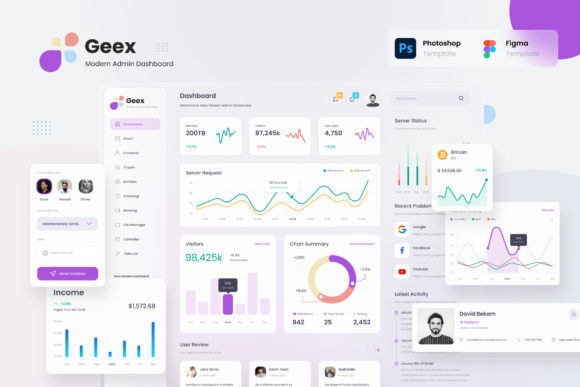
Geex is a modern admin dashboard template built to simplify complex workflows. It features 30 high-quality pages with colorful graphics and an intuitive layout, making it suitable for various use cases like company administration, email management, invoice tracking, calendar organization, Kanban boards, SaaS platforms, and more. The design draws inspiration from the sleek aesthetics of macOS Big Sur, offering a clean, minimalistic interface that's both visually appealing and functional.
Available in both light and dark mode, Geex allows users to adapt the look and feel based on their preferences or brand identity. It supports customization through Figma and Adobe Photoshop files, enabling developers and designers to tailor the templates according to their specific needs. Whether you're building an internal admin panel or launching a new SaaS product, Geex provides a solid foundation for creating professional and responsive dashboards.
Common Mistakes When Choosing an Admin Dashboard Template
Selecting the right admin dashboard UI isn’t just about picking something that looks good—it’s about ensuring it works well for your team and project. Here are some common pitfalls to avoid:
- Overlooking Customization Options: Some users assume all dashboard templates offer the same level of flexibility. Without proper customization tools, adapting the design to match your branding or workflow becomes difficult and time-consuming.
- Ignoring Documentation: A lack of clear documentation can lead to confusion and delays. You might find yourself spending unnecessary hours figuring out how components work instead of focusing on development.
- Not Testing on Multiple Devices: Many templates don’t render consistently across different screen sizes. If a dashboard isn’t responsive, it could hinder productivity for mobile users or cause layout issues on desktops.
- Underestimating the Learning Curve: Even if a dashboard looks elegant, its usability depends on how easy it is to navigate and understand. Complex layouts with unclear icons or labels can slow down your team’s efficiency.
How These Mistakes Impact Your Work
Let’s take an example: imagine you’re setting up a new SaaS platform and choose a dashboard that lacks proper documentation. As a result, your development team spends extra time reverse-engineering how to implement certain features. This not only increases costs but also delays your launch timeline.
Similarly, if a dashboard isn’t customizable enough, you may end up with a generic-looking interface that doesn’t reflect your brand’s identity. This can affect user perception and trust, especially if your clients or employees interact with the system regularly.
Why Geex Stands Out
One of the key reasons people choose Geex is because it avoids these common mistakes by providing a comprehensive and flexible solution. Here’s what makes it a better choice:
- High-Quality Screens: With 30 ready-to-use screens in Figma and PSD formats, Geex ensures you have everything you need to build a polished dashboard quickly.
- Modern and Clean Design: Inspired by macOS Big Sur, the UI is minimalist, organized, and easy to follow—ideal for professionals who value clarity and focus.
- Free Google Fonts: This means no licensing hassles and a consistent typographic experience across all devices.
- Well-Documented Files: Each component is explained clearly, helping you integrate features faster and avoid guesswork.
- Customizability: Use Figma or Photoshop to tweak colors, icons, and layouts to suit your brand or personal style.
Real-World Applications of Geex
Geex is versatile enough to support a wide range of admin interfaces. For instance:
- A small business owner uses Geex as an email dashboard to manage customer inquiries efficiently.
- A developer builds a SaaS admin panel using Geex to ensure a professional appearance without starting from scratch.
- An entrepreneur sets up a Kanban dashboard to track project progress with visual clarity.
- A marketer utilizes the calendar dashboard to plan campaigns and set reminders seamlessly.
In each case, the goal is the same: to reduce complexity and enhance productivity. Geex helps achieve this by providing a structured yet adaptable framework.
What to Check Before Making the Switch
If you're considering adopting Geex or any similar admin dashboard UI, here are a few important factors to review before finalizing your decision:
- Compatibility: Ensure the template works well with your existing tech stack and frameworks.
- Responsiveness: Test how the dashboard behaves on different devices—especially if your users access it via mobile.
- Community and Support: Look into whether there’s an active community or support channels available for troubleshooting and updates.
- Performance: A dashboard should load quickly and handle large datasets smoothly. Avoid templates that sacrifice speed for aesthetics.
- Licensing Terms: Understand the terms under which you can use the template, especially if you're deploying it for commercial purposes.
Better Approach: Evaluate Based on Needs
Rather than choosing a dashboard purely for its looks, assess it based on how well it meets your functional requirements. Ask yourself:
- Will this template save me time during setup?
- Can I easily customize it to align with my brand?
- Does it provide a clear and logical structure for my tasks?
- Is it compatible with the tools I already use?
By answering these questions honestly, you’ll avoid falling into the trap of selecting a tool that looks great but doesn’t perform well in practice.
Key Features to Help You Avoid Poor Decisions
Here are some standout features of Geex that help prevent common dashboard-related issues:
Light and Dark Mode
The dual-mode option gives users the freedom to switch between light and dark themes depending on their environment or preference. This not only improves readability but also enhances user comfort over long sessions.
Comprehensive File Formats
With Figma and Photoshop files included, Geex allows for deep-level customization. You’re not limited to superficial tweaks—this gives you full control over the UI elements and layout.
Clear Guidance and Documentation
Geex includes a ‘Help’ or ‘Guidance’ file that explains how to use each part of the dashboard. This is essential for teams that want to hit the ground running without spending weeks learning the ropes.
Mobile and PC-Friendly
Thanks to its responsive design, Geex works equally well on mobile and desktop platforms. No more worrying about broken layouts or unreadable text when switching devices.
Final Tips for Using Geex Effectively
To get the most out of Geex, start by mapping your admin workflow to the available templates. This will help you identify which screens you need to modify or combine. Also, take advantage of the free Google Fonts to maintain a cohesive and professional look throughout your application.
Don’t rush the customization process. Invest time in understanding the structure of the dashboard so you can make meaningful edits that improve usability rather than complicate it further. And always test your final design on real devices to catch any display inconsistencies early.
Remember, the best dashboard UI isn’t just one that looks great—it’s one that makes your job easier, faster, and more efficient. Geex - Modern Elegant Admin Dashboard UI is designed with exactly that in mind, combining elegance with practicality to deliver a seamless admin experience.